Showing posts with label Jinitiator and IE issues. Show all posts

Thursday, July 17, 2014

All Java SE Downloads on MOS


Hi All.

I'm getting the notifications from Oracle about a new certification products.
One of the notification is New Java version certification for EBS.

There was a link to previous java versions in  www.oracle.com.
Right now all Java versions can be downloaded from All Java SE Downloads on MOS (Doc ID 1439822.1)

For example , you want to download jre-6u81-windows-i586.exe:

This patch include JDK and JRE.
Just download it and install  the relevant.

Good Luck ...


Thursday, March 15, 2012

EBS with JInitiator 1.1.8.16 throw error after Java update

Hi All

This is the new issue that I found after update Java to version 1.6.0_31.
The following error "Uncaught Java Exeption while persisting the null bean" starting in JInitiator console when log-in to Oracle Application with  JInitiator 1.1.8.16.


Or


java.io.NotSerializableException: java.lang.Thread
        at java.lang.Throwable.<init>(Compiled Code)
        at java.lang.Exception.<init>(Compiled Code)
        at java.io.IOException.<init>(IOException.java:45)
        at java.io.ObjectStreamException.<init>(ObjectStreamException.java:30)
        at java.io.NotSerializableException.<init> (NotSerializableException.java:29)
        at java.io.ObjectOutputStream.outputObject(Compiled Code)
        at java.io.ObjectOutputStream.writeObject(Compiled Code)
        at java.io.ObjectOutputStream.defaultWriteObject(Compiled Code)
        at java.io.ObjectOutputStream.outputObject(Compiled Code)
        at java.io.ObjectOutputStream.writeObject(Compiled Code)
        at sun.beans.ole.OleBeanInterface.saveBean(OleBeanInterface.java:508)


Here the quick workaround:
1. Go to Control panel --> Java -->View
 2. Disable Java
Or you can just downgrade the java to the previous version.

Good Luck...


Sunday, December 11, 2011

FRM-92120: Registry.dat is missing in Google Chrome


Hi All


When I log-in to Oracle R12 Application I got the following error:


According the Oracle Document 389422.1 - Recommended Browsers for Oracle E-Business Suite Release 12, Google Chrom not sertified with R12, but there is a workaround with 3d part application.


1. Click here to download and install the User-Agent switcher.
2. Restart your browser and now you should see a mask icon right next to your wrench icon.
3. Click the icon and change the User-Agent switcher to Mac Safari 4.
4. Re-check the issue with login to R12 Application. 
5. Go into the extension manager and click on the options for the User-Agent switcher. Add the host name to the custom domain list, it will help you do not switch User-Agent every time.


Good Luck...

Monday, March 21, 2011

J-Initiator 1.1.8.16 on Windows 7 x64 (64-bit)

Hi All
This issue was not fixed by me, it was fixed by Mando. Greate post and it's work perfect.

Here the link to the post in Mando's blog:
http://www.mandotech.net/2010/10/j-initiator-11816-on-windows-7-x64-64.html

Here the step by step:
1)  Copy the Oracle folder to C:\Windows\Program Files
 (Not the “program files (x86)” folder)
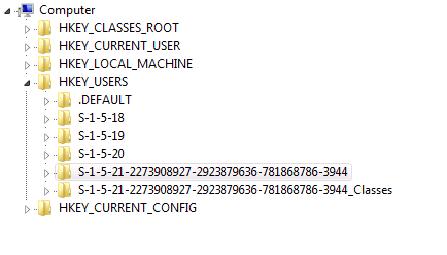
2)  Run Regedit and copy the user ID (the one highlighted below)


3. Open the Reg Folder and edit the two files that have HKEY_USERS in the title with Notepad.
 4. Edit -> Replace
               Copy the current user key in the file and replace with the Win7 user id
  (Ignore that they are the same below, it’s just so you can picture the replacing of the text)

5 . Run all the registry entries I created. You’ll get an error on one of them, but just ignore it. It should be on the HKEY_Local_Machine one, just make sure you don’t get an error anywhere else.

Mando, thanks again. Good work!!!

Sunday, March 6, 2011

Disabling Cross Site Scripting (XSS) filtering in Internet Explorer 8


I found this issue during the upgrade to R12. The Forms were crashed with Cross Site Scripting (XSS) filtering message


Here the workaround:


Step 1
Open Internet Explorer 8, From the tools menu select the last item displayed, titled "Internet Options"


Step 2
Click on the "Security" tab in the internet Option panel, then click on the "Custom level" button three
quarters down the panel.


Step 3
Scroll down the list presented in the "Security Settings –Internet Zone" panel and, locate the "Enable
XSS filter" option (this is almost at the end of the list)


Select the "Disable" option, then click the "OK" button to close the panel and, save your changes.
Click the "OK" button on the "Internet Options" to close an save any changes.


Restart Internet Explorer 8


You can see the PDF version here.

You can also change the preferences via oracle opmn configuration:

Internet Explorer Has Modified This Page To Prevent Cross-site Scripting [ID 1059574.1]


Goog Luck ...

Thursday, March 3, 2011

Fixing Internet Explorer Crash on Launching Oracle Forms Application with jInitiator:

Hi I'm working with a lot of Oracle customers that use Jinit and Java Native... All version are installed in my computer.


Till now I’ve been using Mozilla Firefox, but now the situation demands that I needed to use Internet Explorer. And when I launched Internet Explorer and  Internet Explorer crashes. Did few things, such as disabling all addons, getting rid of Sun’s JVM et al, but made no difference, also re-install the Jinitiator.


Finally,here the solution(or rather a workaround) – replace the jvm.dll in jinitiator directory with that present in Sun’s JRE 1.6. If you don’t want to install the whole bundle – just CLICK HERE(jvm.dll, 2.2 MB), I’ve uploaded just the jvm.dll file, rename the original jvm.dll (present in jinitiator/bin/hotspot directory) to, say jvm.dll.old, and replace it with the one given in the above link. Restart the browser, IE shouldn’t crash anymore.